AI-native AppSec, across your whole SDLC.
Six AI capabilities across your whole SDLC: a panel of AI specialists that ranks your remediation, structured analysis of every repo, an inventory of the AI running inside your repositories, a clear view of the AI tools your developers run, and a server that brings Intercept into your own AI assistant. AI to secure your code — and a clear picture of the AI already in it.
Free to start, no credit card. Paid plans include a free trial.
Every place AI shows up in Intercept
Six capabilities across four jobs: securing your code with AI, seeing the AI in your code, seeing the AI your developers run, and bringing Intercept into your own AI assistant.
AI Advisors
Six security specialists review every scan — a seventh joins for AI-powered repos — and a Lead hands back one ranked, app-calibrated action plan.
AI Insights
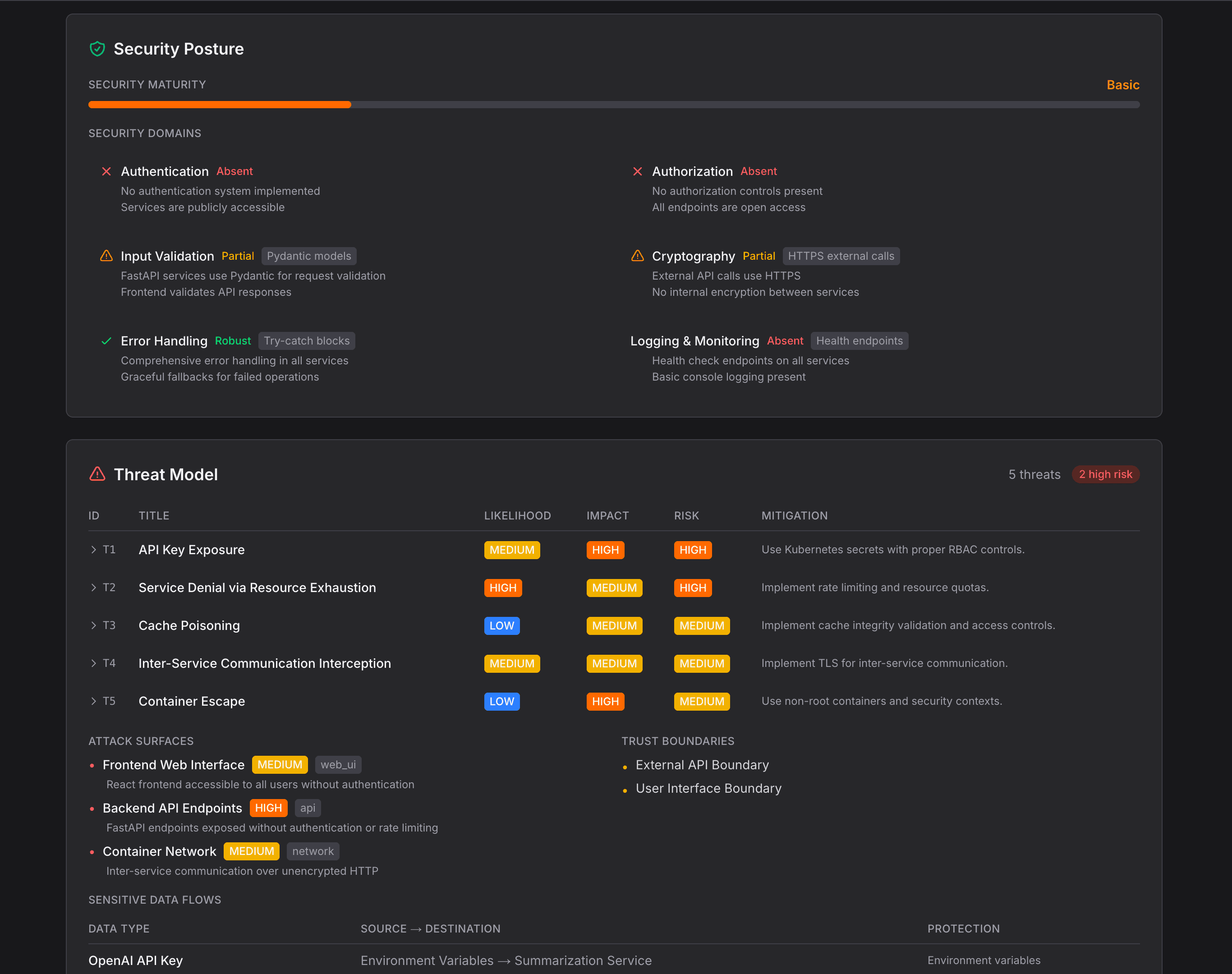
A senior-architect-level read of each repo: a STRIDE threat model, six-domain posture scoring, and an evidence-grounded architecture map.
MCP comes up three times here, on purpose. We ship the Intercept MCP Server so your AI reaches your findings. The Posture Agent's MCP Server Detection finds the servers your developers are running. And AI-BOM lists the MCP servers and clients sitting in your application code. One ships from us, one watches your developers, one reads your repos.
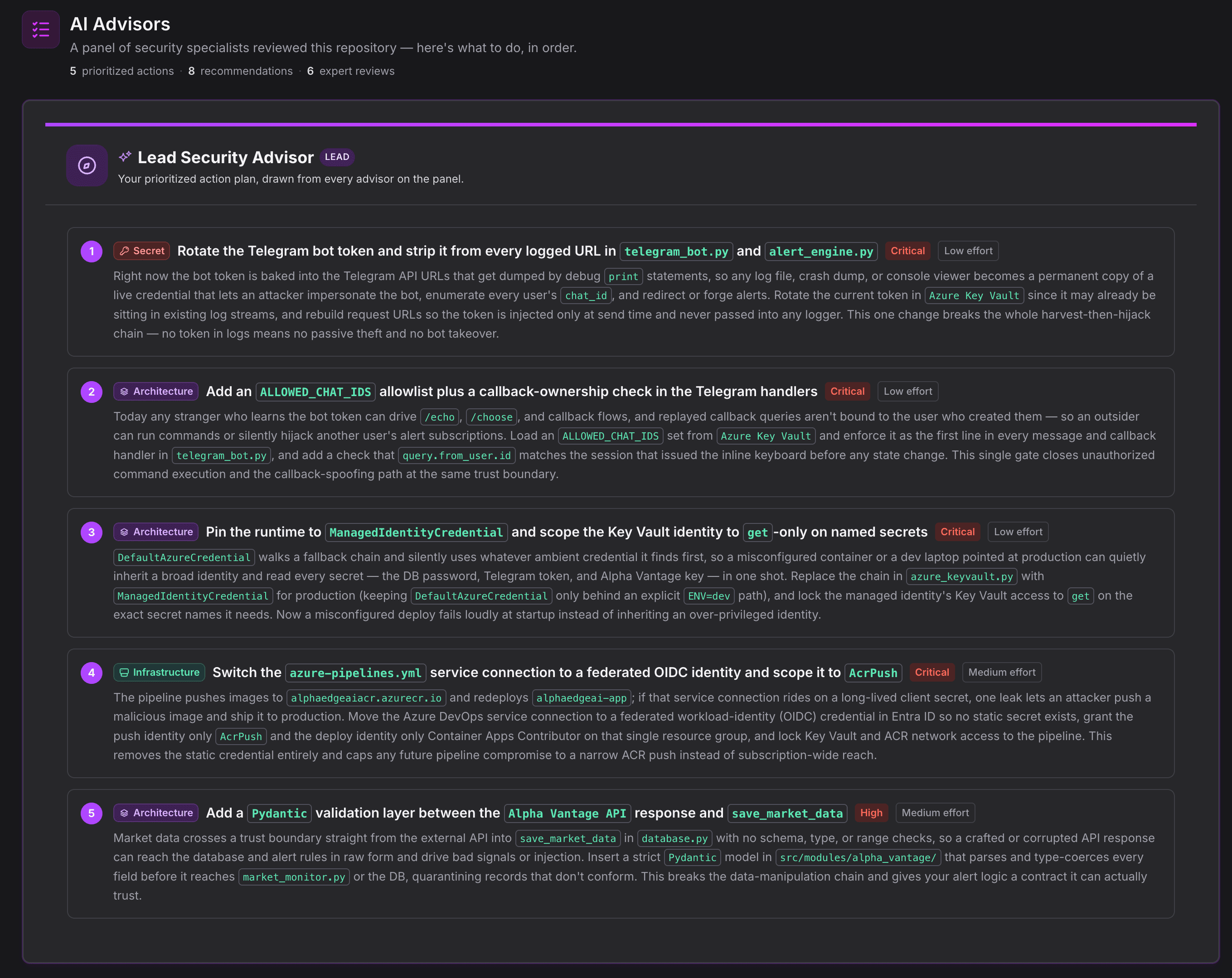
A panel of senior specialists reviewed this repo — here's what to do, in order.
Most teams can't afford to hire an application security engineer, an infrastructure specialist, a compliance auditor, a security architect, and a penetration tester to review every repo. AI Advisors gives you that panel on every scan. Six specialists each read your findings through their own lens — a seventh, the AI Application Security Engineer, joins when your repo uses AI or LLMs — and a Lead Advisor synthesizes their input into one ranked action plan. The security team you haven't hired yet.
Lead Security Advisor
Doesn't add an eighth opinion. The Lead reads what every specialist found, resolves the overlaps and disagreements, and returns one prioritized plan: what to fix first, why it ranks where it does, and what can wait. One voice, accountable for the order.
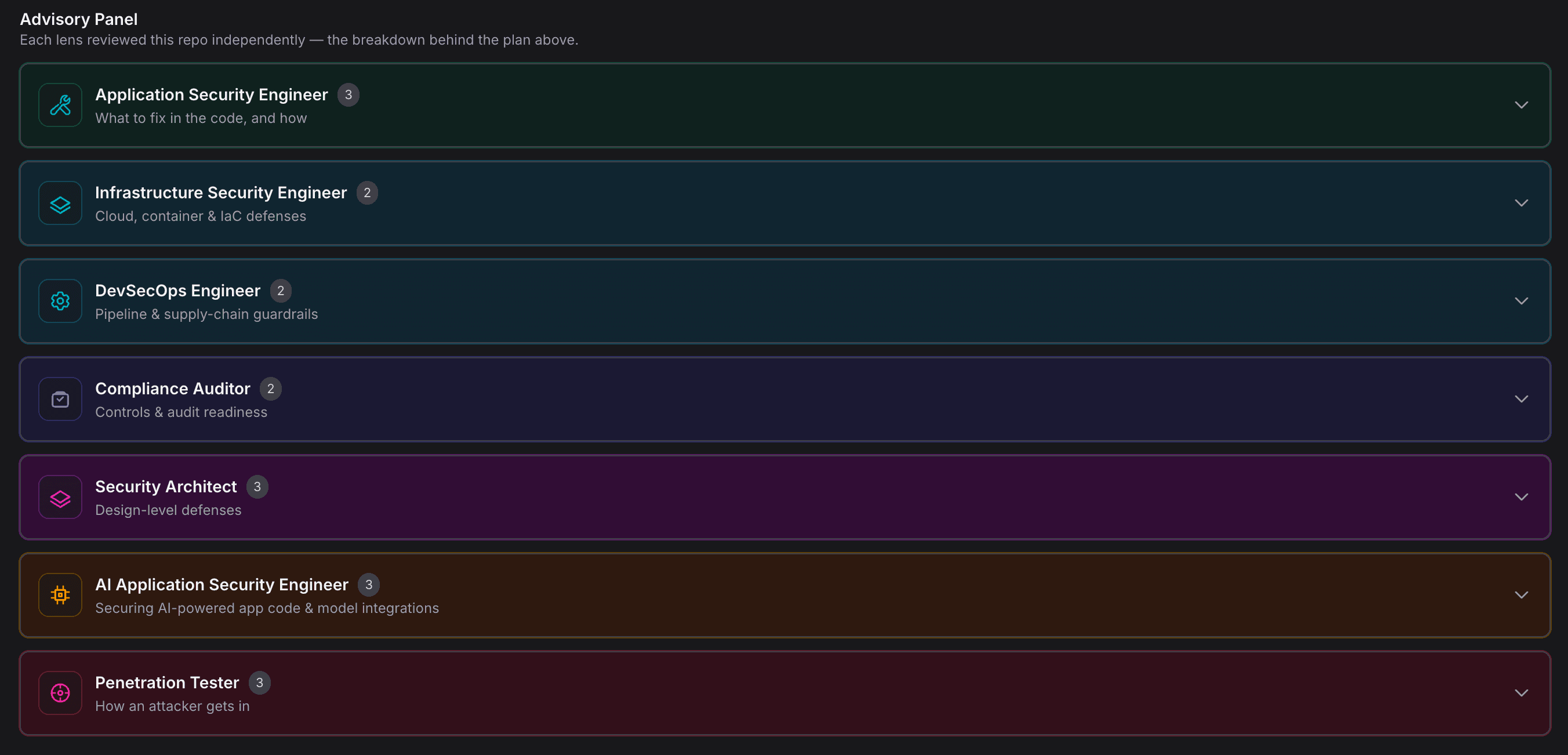
The specialists — a lens each on the same findings
Application Security Engineer
Reviews code-level risk: injection, auth, unsafe deserialization, and the SAST and secret findings that put your application logic at risk.
Infrastructure Security Engineer
Reads your container, image, and infrastructure-as-code findings for misconfiguration, exposed services, and hardening gaps.
DevSecOps Engineer
Looks at the build and delivery path: pipeline integrity, dependency risk, and where a compromise could slip through CI.
Compliance Auditor
Flags the control gaps an audit would surface, before an auditor does.
Security Architect
Steps back from individual findings to assess structural risk, trust boundaries, and design-level weaknesses across the repo.
AI Application Security Engineer
Activates for AI-powered reposReviews AI-powered application code and model integrations — the LLM SDKs, agents, and APIs that AI-BOM inventories — and maps your AI footprint to the OWASP LLM Top 10, the OWASP Agentic Top 10, and the NIST AI RMF. Correlates AI usage with the rest of your findings, so an LLM SDK sitting next to an exposed secret reads as the AI-key exposure it is.
Penetration Tester
Reasons about exploitability and chaining: which findings an attacker would actually reach for, and in what order.
What sets the panel apart
Calibrated to what your app actually is.
The Lead reads each repo’s business context — what the app does, who uses it, the data it handles — and tunes the plan to its real risk profile, not a one-size-fits-all checklist. A throwaway sandbox gets containment-first guidance; a production, internet-facing app handling sensitive data gets the exploitable, data-touching issues ranked first. And when your app’s nature means a flagged finding isn’t really your top priority, the Advisor says so, and explains why.
A panel, not a chatbot.
Six specialists review your repo automatically — no blank text box, no prompt engineering. A seventh joins when your code uses AI.
Grounded in real findings.
Every recommendation traces back to a finding your scanners produced — the panel can’t inflate a low into a critical, and a clean domain is reported as clean.
Cloud advice with zero infrastructure-as-code.
Deploying to a managed platform with no IaC to scan? You still get platform-specific hardening guidance for AWS, GCP, Azure, Vercel, Netlify, Fly.io, Heroku, Cloudflare, and Kubernetes.
A ranked plan, not a wall of bullets.
The Lead returns an ordered sequence you can work top-down — fix this first, then this, this can wait.
It closes the loop, finding to action.
The panel reads the findings already in Intercept and hands back the next step for each — no export, no second tool.
Bring your own Anthropic key — free — or use ours.
Run AI Advisors and AI Insights on your own Anthropic key and pay Anthropic directly — no added cost from us. Prefer managed? Our hosted AI is a paid add-on from $10/mo. There’s no free managed tier, and managed AI is the one feature that needs a card.
Powered by Claude — Sonnet for the panel, Opus for the Lead synthesis. The advisors run as the final stage of an AI-enabled scan; if the stage can't run, the scan still completes with every finding.
A senior security architect's read of every repo.
Before anyone can fix a repo, someone has to understand it — what it does, how it's built, and where the design itself is weak. AI Insights does that work on every AI-enabled scan, reasoning like a senior security architect rather than a line-by-line linter. From a single pass it produces five connected analyses.
STRIDE-classified threat model.
A real threat model for the repo, not a checklist. AI Insights surfaces the most significant architectural threats, tags each to a STRIDE category, rates it on an OWASP likelihood × impact matrix, and pairs it with a suggested mitigation. It reasons about the design — the threats that emerge from how components interact — not the line-level bugs a SAST scanner already reports.
Trust boundaries and sensitive data flows.
It maps where trust changes hands — what sits inside each boundary and what sits outside — then traces sensitive data flows by type and direction, source to destination, and flags the protection on each flow or the absence of it. This is the part most “AI summaries” skip, and it’s the core of a genuine threat model.
Six-domain security posture review, with a maturity rating.
Each of six domains — authentication, authorization, input validation, cryptography, error handling, and logging & monitoring — is rated independently as absent, partial, or robust, with specific observations behind each call. The repo then gets an overall maturity rating on a five-level scale, with the reasoning written out. A repeatable posture assessment, not a vibe.
Evidence-grounded architecture map.
It reverse-engineers the shape of the system — components, external integrations, entry points, and data stores — and backs each one with file-path evidence you can verify. An architecture map rendered as structured cards and lists, not a hand-drawn diagram.
Confidence-rated stack and pattern detection.
Frameworks detected with high, medium, or low confidence; design patterns cited alongside the files that prove them; plus deployment targets and API specifications. You see not just what was found, but how sure the analysis is.
STRIDE threat categories
- Spoofing
- Tampering
- Repudiation
- Information Disclosure
- Denial of Service
- Elevation of Privilege
Six-domain posture, rated absent · partial · robust
- Authentication
- Authorization
- Input validation
- Cryptography
- Error handling
- Logging & monitoring
Overall maturity scale
- Minimal
- Basic
- Moderate
- Strong
- Comprehensive
Insights is understanding; Advisors is action. AI Insights stands on its own — you get the threat model, the posture review, and the architecture map whether or not you ever open AI Advisors. It's also the understanding layer the advisors reason from: Insights builds the picture of the repo, Advisors turns it into a ranked plan.
Know every AI in your code — and where it's exposed.
AI slips into a codebase one import at a time — an SDK here, an agent framework there, a model name hardcoded in a script no one remembers writing. AI-BOM reads your repositories and gives you the bill of materials: every AI component, every place it touches your application, each one backed by exact file-and-line evidence.
What AI-BOM inventories
LLM SDKs
The client libraries that call models — text, voice, and multimodal.
- OpenAI
- Anthropic
- Cohere
- ElevenLabs
- Deepgram
- AssemblyAI
- Suno
- Replicate
- Stability
Agent & RAG frameworks
The orchestration layers that chain models, tools, and retrieval into autonomous behavior.
- LangChain
- LangGraph
- LlamaIndex
- CrewAI
- AutoGen
- Haystack
- Vercel AI SDK
MCP servers and clients
The connectors that hand external tools and data to your models.
- MCP servers
- MCP clients
Model references
Model names pinned directly in your code, not behind a dependency.
- gpt-4
- claude-*
- gemini-*
- o-series
- embedding models
Vector stores
The retrieval backends that feed context into your AI.
- Pinecone
- Chroma
- Weaviate
- Qdrant
- pgvector
- FAISS
What sets AI-BOM apart
It catches the AI with no SDK
Dependency-list inventories only see what’s in your manifest. AI-BOM reads the code, so it catches direct REST calls to providers like Azure OpenAI, Groq, OpenRouter, Together, and Perplexity — the AI usage that never shows up as a package.
Every finding cites its source
Each component comes with the exact file, line, and code snippet, and deep-links straight to GitHub or Azure DevOps. No guessing where the AI lives — go look at it.
Beyond text models
Voice, speech, and multimodal AI count too. AI-BOM inventories the providers most tools ignore — synthesis, transcription, image, and audio — not just the text LLMs.
Zero cost, zero data egress
AI-BOM is pure static analysis. No LLM calls, no AI spend, and nothing leaves your environment. Run it on every scan without a second thought.
It feeds an AI security advisor
Your inventory doesn’t sit on a shelf. It feeds an AI Application Security advisor that maps your footprint to the OWASP LLM Top 10, the OWASP Agentic Top 10, and the NIST AI RMF.
Where you see it. Find it in every repository's findings — the full AI inventory, grouped by category, each component linked to the line of code that introduced it.
Straight scope: AI-BOM reads Python and JavaScript/TypeScript today. Detection is signature-based — known providers, frameworks, and hosts are caught reliably, but a custom in-house wrapper or a provider that shipped last week may slip through. It inventories AI in your code, not model files sitting on disk, and not API keys — secret detection handles those. Export isn't available yet.
Your developers are running AI tools. Do you know which ones?
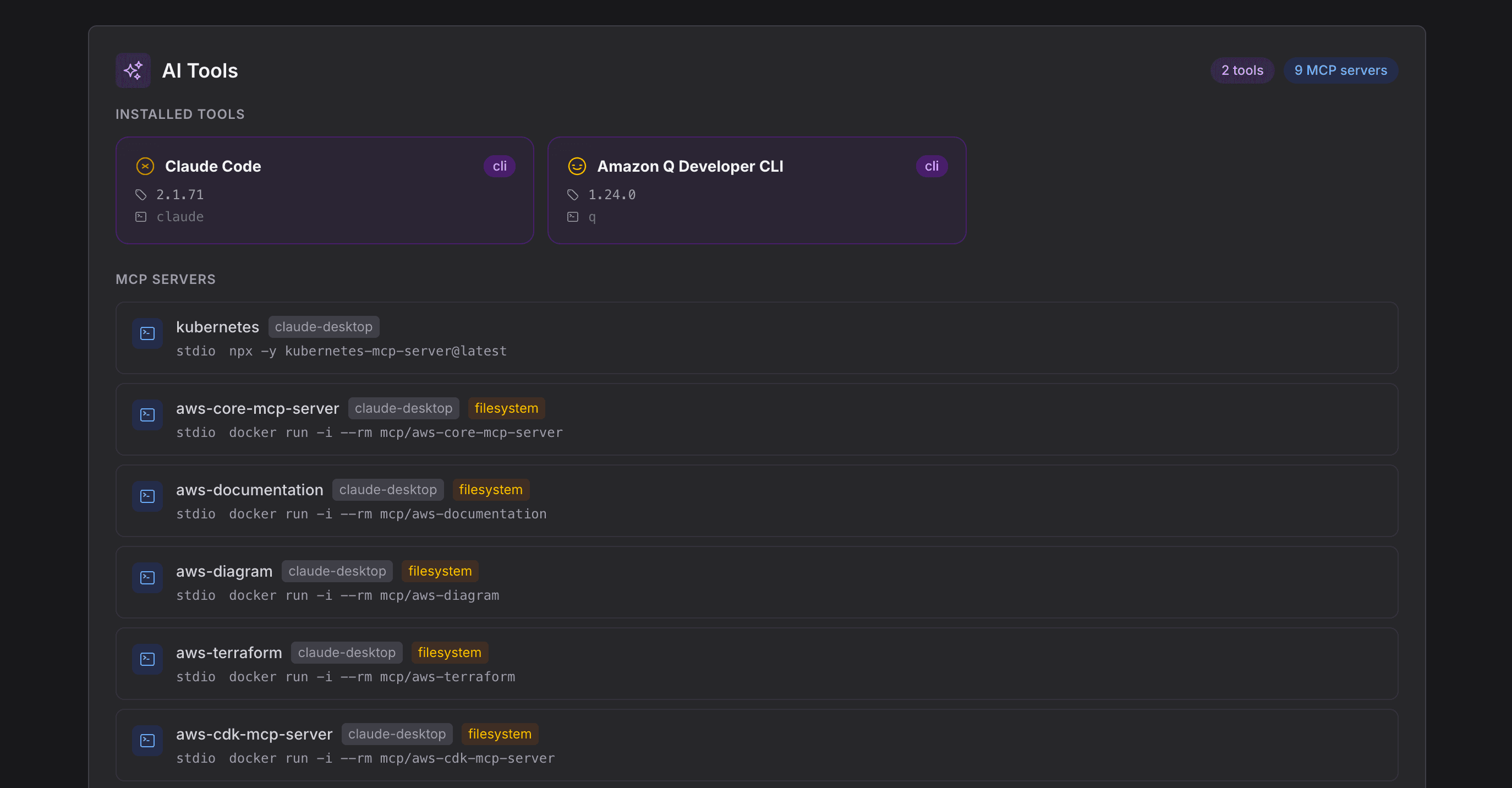
AI coding assistants and the MCP servers behind them are now part of every developer's machine — and a new attack surface most security teams can't see. The Posture Agent gives you that visibility in two parts: an inventory of the AI tools your developers actually run, and detection of the MCP servers wired into them.
Know which AI assistants are on your developers' machines.
The Posture Agent discovers the AI coding tools in use across developer machines — Claude Code, GitHub Copilot, Cursor, Windsurf, Amazon Q, Cody, and more — so you're working from what's actually installed, not a survey or a guess.
Find the MCP servers your developers wired in — and the risky ones.
Every MCP server an AI assistant connects to widens what that assistant can reach. The Posture Agent detects the MCP servers connected to those tools and shows what each one can touch, then flags the configurations that can run shell commands, reach credentials, open the network, or access the filesystem — so the dangerous ones don't hide in the list.
This is detection, not deployment. The Posture Agent finds the MCP servers your developers are running. That's the opposite end from the Intercept MCP Server below, which is the one we ship for your AI to connect to Intercept. In short: we ship an MCP server — we also find the ones your developers are running.
Metadata only. The Posture Agent captures environment-variable names, never their values, and never reads the contents of your keys, credentials, or tokens.
Opt-in, and separate. It runs on developer machines, apart from your repo scans. It inventories and flags — it doesn't block or change anything.

Your security posture, one command away.
Connect Intercept to your AI assistant and work your findings in plain language. “What's critical in the payments service?” “Mark these as accepted risk.” “Re-scan the API gateway.” Your AI does the reasoning. Intercept hands it findings from all six scans — and records your decisions. Built on standard MCP and OAuth 2.1, so any MCP-compatible client works.
What your AI assistant can do
Ask across every kind of finding
Query findings from all six scans in plain language — code (SAST), secrets, dependency vulnerabilities, container, infrastructure as code, and pipeline. Pull a repository’s posture or a tenant-wide summary, and read the AI Advisors plan and AI Insights for any repo inline.
Triage without leaving your terminal
Set a finding’s status as you reason through it — accepted risk, false positive, fixed — or reopen it. Clearing a wave of noise? Bulk-update findings in a single pass, no dashboard required.
Leave a record
Comment on a finding without changing its status. The context you worked through stays attached to the finding, for the next person who opens it.
Kick off a rescan
Trigger a fresh scan of a repository when you need current data — then query the new results in the same conversation.
Reads
- Findings across all six scans: code, secrets, dependencies, containers, IaC, and pipelines
- Repositories, scans, and organizations
- Per-repo security posture and a tenant-wide posture summary
- The AI Advisors remediation plan, inline
- AI Insights for any repo, inline
Acts
- Set a finding’s status — accepted risk, false positive, fixed, and more
- Bulk-update findings in one pass
- Comment on a finding without changing its status
- Trigger a rescan of a repository
Read-first by design. The only four things it can change: a finding's status, a bulk status update, a comment, and a rescan — each only with your consent. It doesn't touch your code, your pipeline, or your program. It reads your findings and records your decisions.
Setup to triage, in one sitting
A short walkthrough: connect Intercept to your AI assistant, ask for every vulnerability in a repo across all six scans, then fix the criticals and mark the rest — with Intercept writing back the status.
Built for a security audience
No API keys, ever
Connect through browser sign-in with OAuth 2.1 and PKCE. Tokens are scoped to you, refresh automatically, and only ask you to re-authenticate after about 30 days of inactivity. Nothing to copy, paste, or leak.
Your AI reasons. Ours never sees it.
Intercept runs zero AI inference on its side. Your own Claude subscription does the thinking; Intercept proxies the tool calls and returns your findings. It never sees your prompts or your assistant’s output.
Read by default. Writes need your yes.
The connection is read-only until you say otherwise. The four actions that change anything — update status, bulk-update, comment, trigger scan — require your explicit consent. Tokens stay revocable.
Scoped to your tenant
Every token is bound to your account and your tenant. The server reaches exactly the data you can already see in Intercept — nothing across the boundary.
Setup is one command
Add the server, connect, and sign in to Intercept to approve access. Here's all it takes — shown in Claude Code, as an example client.
claude mcp add --transport http intercept https://intercept.hijacksecurity.com/mcp/Then run /mcp, sign in to Intercept in the browser, and approve.
Works with any MCP-compatible client.
- Any MCP-compatible clientstandard MCP + OAuth 2.1
What Intercept's AI will — and won't — do.
Secrets never reach the model
When AI reviews your code, it sees finding metadata — never the secret itself. The values stay in your tenant, full stop.
Bring your own Anthropic key. Your data stays yours.
Run AI Advisors and AI Insights on our infrastructure or on your own Anthropic key. Either way, Intercept persists the advice, not a reasoning transcript — your code isn’t used to train anything. Bring your own Anthropic key at no added cost, or use managed AI from $10/mo.
Grounded in real findings
The AI doesn’t invent findings. It organizes the evidence your scanners already produced — severity clamped in code to what the scan actually found, every recommendation traceable to its source.
AI-BOM never leaves your environment
Inventorying the AI in your code is pure static analysis — no LLM calls, no AI spend, and no data egress. Nothing about your code leaves your environment to produce it.
Powered by Claude — Sonnet for the panel, Opus for the Lead synthesis.
FAQ
What’s actually in Intercept’s AI suite?
Six capabilities. AI Advisors ranks what to fix. AI Insights explains each repo. AI-BOM inventories the AI in your own code. The Posture Agent inventories your developers’ AI tools and detects the MCP servers behind them. And the Intercept MCP Server connects your own AI assistant to Intercept’s data.
What is AI-BOM, and how is it different from an SBOM?
AI-BOM inventories the AI in your own code — the models, SDKs, APIs, and agent frameworks your application calls — across Python and JavaScript/TypeScript. It’s pure static analysis: nothing leaves your environment, and every entry comes with file-and-line evidence and a deep link to the source. An SBOM lists your software dependencies; AI-BOM lists your AI ones.
There are three places “MCP” shows up here. What’s the difference?
The Intercept MCP Server is the one we host, so your AI assistant can reach Intercept’s findings and posture over an OAuth-authenticated connection. MCP Server Detection is part of the Posture Agent — it finds the MCP servers your developers are running on their own machines and flags risky ones. And AI-BOM isn’t a server at all: it inventories the MCP servers and clients sitting in your application code, with file-and-line evidence. One ships from us, one watches your developers, one reads your repos.
Is AI Advisors a chatbot I have to prompt?
No. AI Advisors runs automatically as the final stage of a scan. Six specialists review your findings through their own lens — a seventh, the AI Application Security Engineer, joins when your repo uses AI or LLMs — and a Lead Advisor synthesizes them into one ranked plan. No blank text box, no prompt engineering.
Can the AI invent risks or inflate severity?
Every recommendation traces back to a finding your scanners produced, and severity is capped to what the scan actually found. When a domain is clean, it’s reported as clean.
Does the model ever see our secrets?
No. The Application Security Engineer sees secret metadata — type, location, status — never the secret value itself.
Can we bring our own Anthropic key?
Yes. AI Advisors and AI Insights run on your own Anthropic key at no added cost — you pay Anthropic directly and your data stays yours. Or use our managed AI, a paid add-on from $10/mo. There’s no free managed tier; BYOK is the free AI path.
What can the Intercept MCP Server actually change?
It’s read-first: 18 of its 22 tools just query findings, posture, and AI output. The only four that change anything are updating a finding’s status, bulk-updating status, commenting, and triggering a scan — and the write actions need your explicit consent. It connects over browser-based OAuth with no API keys to manage, is scoped to one tenant, and every change is attributed to the MCP connection.
What does the Posture Agent collect from developer machines?
Metadata only — the names of AI tools, the MCP servers connected to them, and what each server can access. It captures environment-variable names, never their values, and never reads your keys, credentials, or tokens.
Will an AI failure break my scan?
No. The advisors are additive. If the AI stage can’t run, the scan still completes with every finding intact.
Intercept's AI is part of the full Intercept platform.
Stop triaging. Start fixing — in order.
Six AI capabilities, one platform: rank what to fix, understand every repo, inventory the AI running inside your repositories, see the AI your developers run, and bring Intercept into your own assistant.